
AI SRE and AI DevOps in Practice: Using PandaSi to Let an Agent Centrally Manage Multiple Servers
AI SRE and AI DevOps can be put into practice starting with a unified server inventory and read-only inspection. This article uses PandaSi to connect to the Agent on the management machine, verify multiple servers one by one over existing SSH, summarize the inspection results, and then implement changes through a per-server pilot, staged approval, and rollback process.

Using PandaSi to let an Agent centrally manage multiple servers can start from one authorized management machine: run PandaPaw and the Agent on the management machine, and have the Agent access the explicitly listed targets through existing SSH, VPN, or bastion hosts, verify identity one by one, run batch read-only inspections, and summarize the results; when changes are needed, trial them on a single machine first, then roll them out in approved batches. AI SRE focuses on investigating reliability issues, while AI DevOps focuses on delivery and infrastructure changes; both require reviewable evidence and permission boundaries.
PandaSi provides cross-device session and approval entry points, PandaPaw connects to the execution machine, and the specific commands are executed by the selected Agent and its tools. Completing onboarding does not mean you have obtained company server permissions, nor does it mean 24/7 monitoring, automatic alert ingestion, or unattended remediation systems have been deployed. The following is for developers and operations staff who already have server operations permissions and want to follow up on work from a phone or another computer; it walks through management machine onboarding, multi-server read-only verification, result summarization, and staged change processes. Servers can also be installed directly one by one, but the multi-server main line in this article uses the management machine approach.
AI SRE and AI DevOps: What Should the Agent Help With in Each?
These two terms describe work scopes that overlap. This article uses the division below to understand them, rather than treating them as two products that must be purchased separately.
| Dimension | AI SRE | AI DevOps |
|---|---|---|
| Core question | Is the service reliable, why did the failure occur, and how do we recover and reduce recurrence | How do we deliver software and manage infrastructure more reliably |
| Typical tasks | Organize logs, correlate anomalies, check dependencies, propose recovery recommendations, assist with retrospectives | Read pipelines, check deployment configuration, prepare changes, analyze release failures |
| Agent inputs | Authorized logs, metrics, topology, incident timelines, and runbooks | Repositories, pipeline records, infrastructure configuration, and release rules |
| Deliverables | Evidence, possible causes, risks, recovery and verification plans | Reviewable diffs, execution plans, rollback conditions, and delivery evidence |
| Decisions people should retain | Business impact, change approval, recovery acceptance | Release approval, access control, environment and resource boundaries |
For example, if a test service returns 502 right after release: investigating which layer the request fails at leans toward AI SRE; reviewing the release configuration that caused the issue and preparing the next delivery leans toward AI DevOps. The same Agent session can complete both types of work; the key is task scope, tool permissions, and acceptance criteria.
Step 1: Choose the Execution Location and Obtain Company Authorization
Before installation, write down three answers: which machine is allowed to connect, which system user it runs as, and which directories and services it is allowed to access. Whether the company allows logs or code to be sent to external models should also be confirmed before onboarding. Being able to log in via SSH personally does not mean the company has approved binding a personal account to a remote Agent.
Path A: Run directly on the server. First confirm that the company approves not only a user-level Agent service but also the device networking and network service changes involved in the default installation process; the current installation script may call sudo on applicable systemd hosts to register a system-level network service. Obtain the corresponding authorization for installation, privilege escalation, and network changes, and make sure the host meets the current support requirements before installing PandaPaw on the server. The working directory, shell, and tools selected afterward all belong to this execution machine. Do not default to root just because it is "more convenient."
Path B: Use an authorized management machine to reach the servers. If the server does not allow installation, install PandaPaw on a company-approved management machine and run the Agent there too. The management machine must already be able to reach the target servers through company-approved SSH, VPN, or bastion hosts and have the corresponding account permissions. The Agent then uses this existing channel; PandaSi will not approve access for you, bypass the bastion host, or automatically connect to the company intranet.
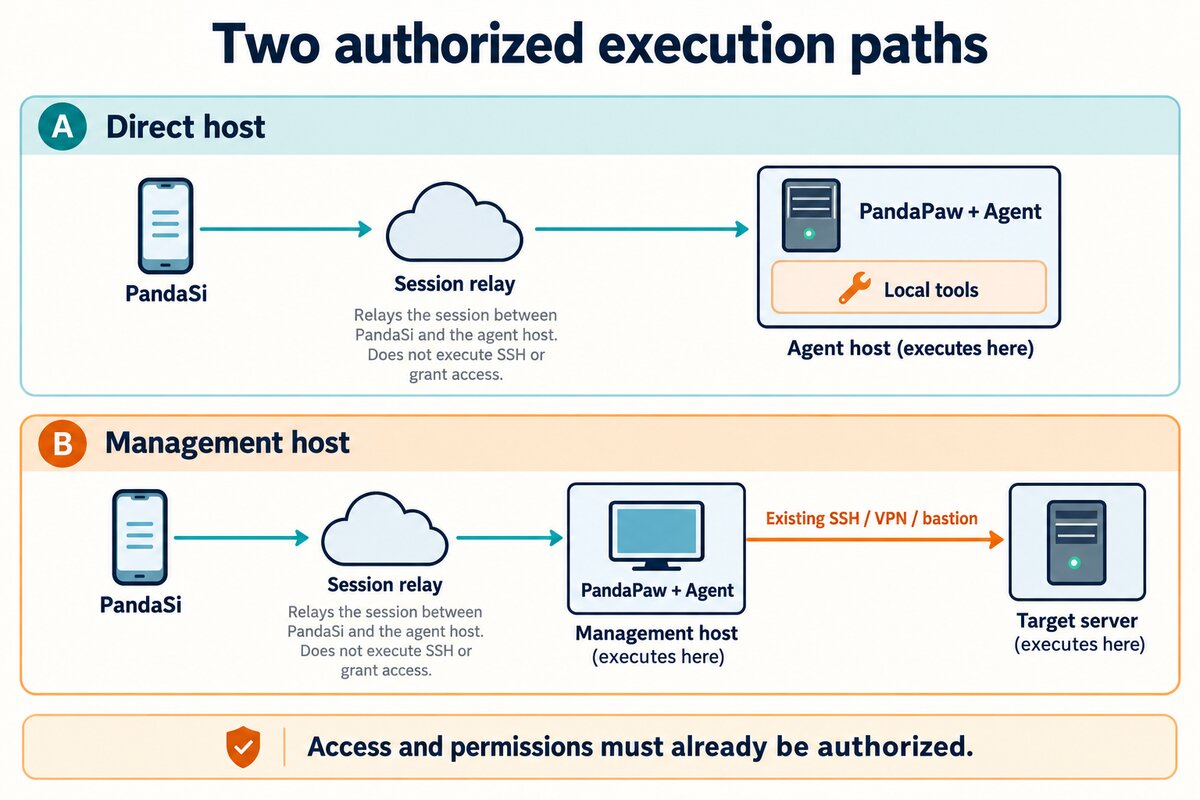
The easiest thing to confuse in the two paths is "the current machine." In the management machine approach, the Agent runs pwd by default and sees the management machine directory; only commands explicitly executed through SSH happen on the target server. A server name appearing in the session does not replace identity verification.
Step 2: Install PandaPaw on the Execution Machine
Go to the workbench from PandaSi, log in, open the devices page /devices?add=1, choose to add a device, and copy the one-time installation command generated by the page for the current operating system. The default installation includes device interconnection configuration and may request privilege escalation and change system network services; first have a company administrator review the installation contents and approve the corresponding permissions, then run the command on the execution machine selected in the previous step. If only user-level access is approved and device networking is not, do not directly run the default installation command in this article; first confirm the approved installation plan with the administrator. If entry points or brand copy change by version, refer to what the current workbench displays; for the related host process, you can also refer to Quick Start.
The one-time command contains device pairing credentials. Do not paste it into chats, tickets, public scripts, or screenshots, and do not reuse the same command to onboard multiple machines; if it has been used or has expired, obtain a new one from the devices page.
If you do not use the command with one-time credentials, the basic installation entry point for macOS / Linux is:
curl -fsSL https://cos.pandanpc.com/pandapaw/install.sh | shThis downloads and executes the installation script, so you should first follow the company's software installation and script review process. This review was checked only against the current documentation and source code; installation and pairing were not actually tested on a clean host; the public installation script download entry point was confirmed accessible. See PandaPaw Host Guide for host platform compatibility and installation details.
If account authorization for the basic installation is not complete, continue on the execution machine:
pandapaw loginFollow the displayed device authorization process to complete pairing, then check:
pandapaw statusIf the command is not found, first open a new terminal and let the shell reload PATH. Do not repeatedly install or force a new login just to "try it out"; first distinguish between three cases: binary not found, account not bound, and background service abnormal.
Step 3: Choose the Machine, Engine, and Working Directory
Open the workbench /agent, select the execution machine you just onboarded, then choose Claude Code, Codex, or PandaCode, and an approved working directory. Validate with a test directory first, and avoid entering a production configuration directory right away.
Device pairing and model login are two different things. PandaPaw login means the host has established a connection with the workbench account; the selected engine still needs usable model authorization, subscription, or API configuration. If the device is online but there is no model response, first check the engine login prompt, quota, and model configuration; do not just reinstall PandaPaw.
Also check the engine's tool permission settings. Writing "do not modify yet" in chat is a task constraint and cannot replace operating system permissions or the engine approval mechanism. If per-action approval is required, configure the corresponding permission mode; do not assume every command will automatically show a confirmation card.
Step 4: Verify Identity First with a Read-Only Request
For the first task, do not write "fix the server"; first send:
Only perform identity verification, and do not modify files or services. Report the current hostname, system user, and absolute working directory, and list the top-level filenames in the directory. Do not read .env, private keys, or other credentials. If access to the target server is needed, first explain the difference between the current execution machine and the target, and wait for me to verify before continuing.
The identity verification commands available on Linux / macOS are:
hostname
id -un
pwd
You should compare the return values item by item with expectations: whether it is the same execution machine, whether it is the approved account, and whether it is the correct project directory. Similar directory names, a device being online, and a command exit code of 0 cannot by themselves prove that onboarding is correct.
The management machine approach also requires verifying both ends separately. The following only demonstrates using an SSH alias that the company has already configured; company-test-server is an example and must be replaced with a target confirmed by the administrator:
ssh company-test-server 'hostname; id -un; pwd'Do not solve the first-connection prompt by disabling host key verification, and do not paste SSH passwords or private keys to the Agent. The remote pwd may be the account home directory, so you cannot assume from it that the project has been selected; subsequent commands should explicitly use the remote project's absolute path.
Pass criteria: the reply content corresponds to the correct host, identity, and directory; you can see what was executed; and permission prompts appear as expected under the current permission mode. After that, re-enter the same session from your phone or another client and check whether the history can be restored. This is closer to the real usage path than just looking at an online green dot.
Step 5: Build a Server Inventory First, Then Run Batch Read-Only Inspections
An Agent on one management machine can call existing SSH to access multiple servers in the inventory in sequence; PandaSi lets you follow these tool operations and results in the same session. "Centralized management" here comes from a single execution entry point, an explicit inventory, and a unified report; it does not mean the product has built-in server asset discovery, automatic dispatch across connections, or a one-click mass-control interface. The management machine must already be authorized for each target; being able to access one machine does not imply access to other machines on the same subnet.
Lock Down Targets with Aliases and Environment Grouping
Have the administrator maintain an inventory that contains no credentials. All names below are fictional examples; the actual inventory should be stored in a company-approved location and must not contain passwords, private keys, or one-time device commands.
| Environment | SSH alias | Expected hostname | Expected user | Remote project directory | Authorization for this round |
|---|---|---|---|---|---|
| test | test-web-01 | demo-test-web-01 | opsread | Approved absolute path for Project A | Identity verification, read-only check of specified services |
| test | test-worker-01 | demo-test-worker-01 | opsread | Approved absolute path for Project A | Identity verification, read-only check of specified services |
| production | prod-web-01 | demo-prod-web-01 | opsread | Approved absolute path for Project A | Excluded this round; apply separately |
| production | prod-web-02 | demo-prod-web-02 | opsread | Approved absolute path for Project A | Excluded this round; apply separately |
SSH aliases are names in the management machine's existing SSH configuration, not PandaSi device names. The administrator should verify the target, account, port, and any necessary access relay corresponding to each alias; you cannot confirm a machine is a test machine just because its name contains test. OpenSSH supports matching configuration by Host entries, and remote commands specified on the command line execute on the target host. See the SSH client configuration manual and SSH command manual.
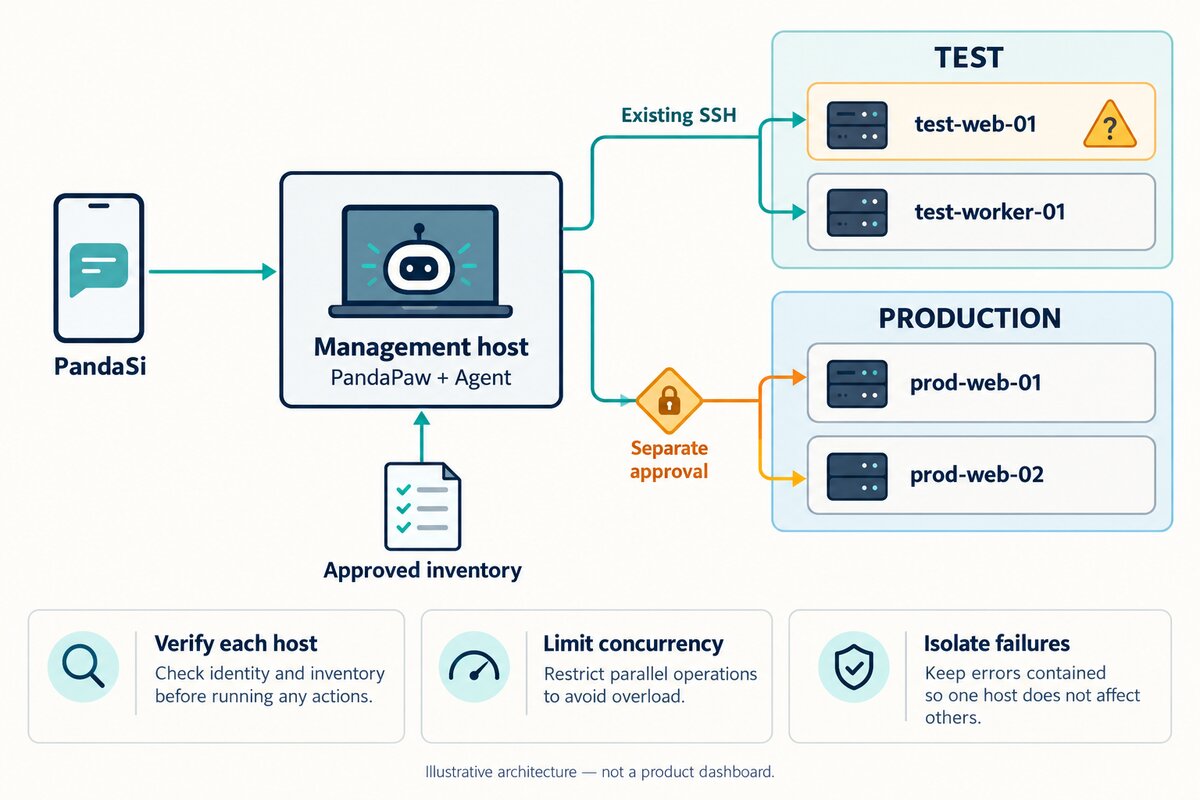
If PandaPaw is installed separately on each server, you can also select the corresponding execution machine in the workbench and operate machine by machine; but do not understand "multiple machines are online" as one session automatically scheduling all connections. The rest of this article uniformly uses the management machine over existing SSH approach, to avoid mixing two execution locations in one report.
Verify Serially First, Then Limit Inspection Items
For the first time, perform identity verification machine by machine according to the inventory, without reading application configuration or complete logs. Below is a serial example for Bash on the management machine, listing only the two test machines allowed in this round; it does not perform automatic environment identification, nor does it replace human verification of expected identity.
for target in test-web-01 test-worker-01; do
  printf '\nTARGET %s\n' "$target"
  if ssh -T -o BatchMode=yes -o ConnectTimeout=5 "$target" \
    'hostname && id -un && pwd'; then
    printf 'IDENTITY_COMMAND_COMPLETED %s\n' "$target"
  else
    result=$?
    printf 'IDENTITY_COMMAND_FAILED %s exit=%s\n' "$target" "$result" >&2
  fi
done
These commands are only used to illustrate organization; this article did not run them on these two example hosts. BatchMode=yes makes authentication failure not wait for interactive input; ConnectTimeout=5 limits the connection establishment phase, not the total time limit for the entire remote command. The overall execution time limit should be set separately by an approved tool or task executor. Do not disable host key verification just to run in batches; bastion hosts that require interactive MFA should use the company-approved access process, not this non-interactive example.
After the commands complete, first compare the expected hostname and account in the inventory one by one, then verify the approved remote project path. The pwd output above is usually only the remote login directory, not proof that the project path is correct. A command exit code of 0 only means these commands completed; it does not mean the host identity matches, let alone that the business is healthy. If any machine's identity does not match, mark that target as blocked and do not continue reading business data; if common doubts appear in the same environment or access channel, pause the entire batch of verification.
After identity verification passes, have the Agent run the same set of approved read-only checks against the test machines in this round: specified service status, expected listening ports, remaining disk space, sanitized error summaries within a specified time window, and one approved health request. Do not expand "inspection" into installing probes, recursively reading all directories, or automatic remediation. Check commands differ across systems, service managers, and applications, so complete them according to the inventory and do not force one set of commands onto all hosts.
Use One Prompt to Make the Execution Boundary Clear
You are running on the management machine. Access only test-web-01 and test-worker-01 in the test group according to the approved server inventory; do not scan new addresses and do not access the production group. First verify each hostname, user, and remote project absolute path serially, and block that target if it does not match the inventory. After passing, only check service status, ports, disk, and health requests explicitly authorized in the inventory; take only sanitized snippets from logs within the specified time window. Keep everything serial for the first pass; do not modify configuration, restart services, install dependencies, or automatically escalate privileges. If a single connection fails, preserve the error and continue independent read-only checks on other verified targets; if environment ownership or a shared access channel appears abnormal, pause the entire batch. Record time and time zone, commands, exit status, key evidence, and incomplete items separately for each machine, and summarize by server at the end. Provide recommendations for any fixes separately; do not execute them.
This is a task constraint and should also be paired with a read-only account, engine tool approvals, and network access restrictions. Writing "no modifications" into the prompt does not automatically turn a writable account into a read-only account.
Limit Concurrency and Keep Failures with the Corresponding Target
Serial inspection is easier to verify for the first pass; when there are many targets, you can set a small concurrency cap under company-approved tool execution methods, for example checking at most two machines at the same time. The "two machines" here is an example operating budget, not a PandaSi product limit or performance guarantee. If the selected Agent or tool cannot reliably limit concurrency, continue serially and do not replace it with temporary unlimited background tasks.
Set an independent timeout and result record for each check; one target failure should not trigger restarts, reinstallations, or unlimited retries for the entire batch on other machines. Record connection timeouts, identity mismatches, insufficient permissions, and failed check commands separately; do not compress them all into "offline." If the error comes from a shared bastion host, authentication source, or unclear environment ownership, stop and verify the common cause instead of continuing to increase concurrency.
The summary table must list, for each machine, whether identity matches, which checks actually ran, key evidence, and unknown items. The following only shows the record format; the text in the table is filling instructions, not actual test results:
| Target | Identity verification | Service and health checks | Reason not completed | Next step |
|---|---|---|---|---|
| test-web-01 | Fill in actual evidence | Record as unknown before execution | Fill in according to actual situation | Decide after verification |
| test-worker-01 | Fill in actual evidence | Record as unknown before execution | Fill in according to actual situation | Decide after verification |
The report should state "how many machines were planned, how many completed, how many failed, how many skipped," and provide evidence for each target. Missing results cannot default to healthy; a final exit code of 0 for a batch command also cannot hide that a machine failed midway.
Step 6: First Complete a 502 Investigation and Recovery on One Test Service
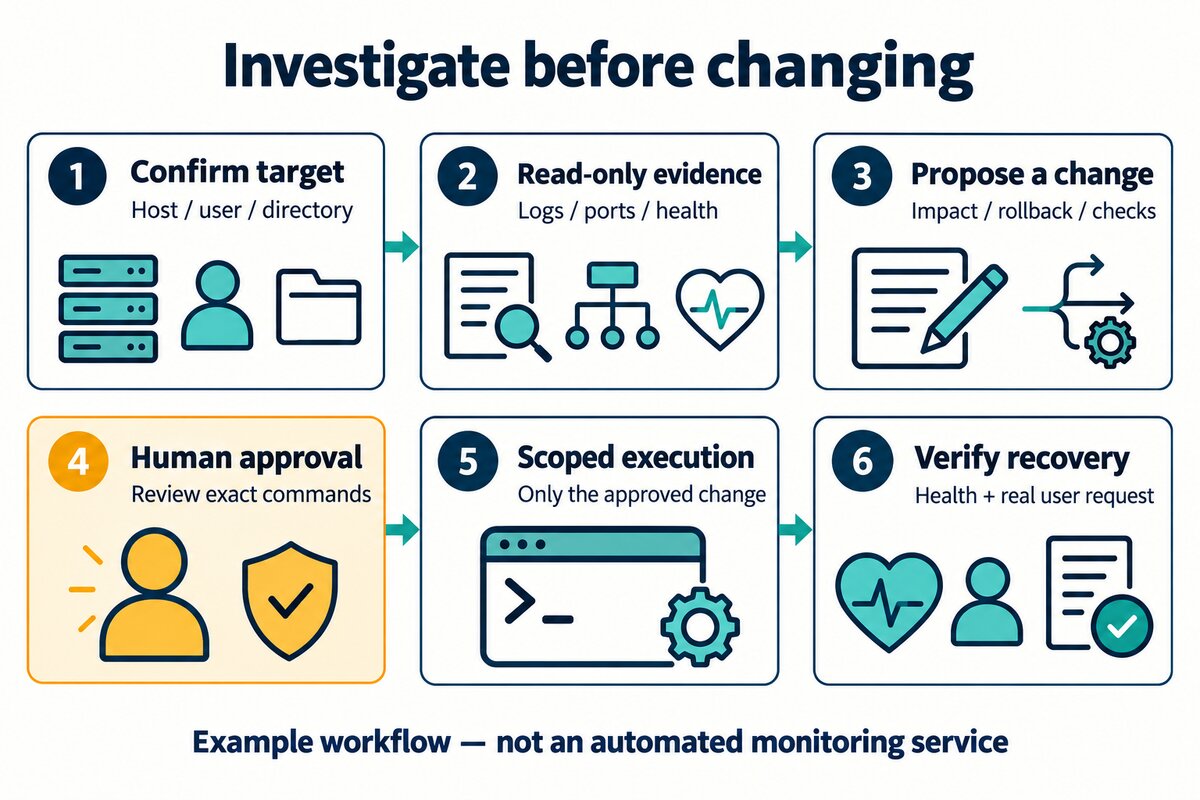
The following is a teaching example, not an actual incident tested in this article, nor a set of remediation commands that can be copied to all servers. Suppose an approved test service returns 502 after release, and you already know the test domain, service name, and project directory.
First Limit the Investigation Scope
You can write the task like this:
Investigate the 502 after the test service release. First verify the target host, user, and directory, and read-only check the most recent release record, related service status, listening ports, and proxy and application logs in the specified time window. Do not restart, change configuration, install dependencies, or access other environments. Return only sanitized snippets relevant to this failure, and list evidence, possible causes, and what information is still missing.
Specify the time window and explicit log sources first, to avoid the Agent recursively searching the entire server. Read-only access can still leak data: tokens, customer information, and request bodies in logs should still be filtered before entering the model context; do not send them out and then ask the model to "forget."
502 means the proxy could not obtain a usable upstream response, but the status code alone cannot determine whether it was a process exit, port mismatch, dependency anomaly, or connection issue. Have the Agent align the proxy upstream address, actual listening state, and logs from the same time period; unify time zones first for cross-machine logs. Do not treat "the machine is online" as "the application is healthy," and do not treat the absence of matching logs as proof that no error occurred.
Require a Reviewable Remediation Proposal
If the evidence supports "the upstream port in the release configuration does not match the actual listening port," have the Agent submit the specific files and minimal diff, proposed commands, affected test service, configuration check method, and rollback conditions. This is still only a conditional example; if the evidence does not support it, continue investigating.
The approval object should be a specific change, not "you have full authority to handle it." For example, approve modifying a specified test proxy configuration and reloading that test proxy after the configuration check passes; do not also upgrade dependencies, clean the database, change production configuration, or restart the entire host. Actual commands must be determined according to the process manager and deployment policy in use.
Verify the User Path After Execution
After approving execution, acceptance should cover at least: whether the configuration check passes, whether related processes and ports match expectations, whether the health endpoint is normal, and whether an actual test request from an independent client through the original entry point recovers. If the health endpoint returns 200 but business routing, authentication, or database requests still fail, you cannot write "the issue is resolved."
Finally, have the Agent summarize executed commands, actual changes, verification results, and remaining risks; explicitly write unknown for items that were not verified. Return confirmed causes and follow-up recurrence-prevention measures to the company's record system. The investigation phase uses AI SRE assistance; incorporating the fix into the configuration repository and release process later extends into AI DevOps.
Step 7: After One Machine Passes, Change Other Servers in Batches
Authorization for batch inspection and batch changes should be separate. Finding that multiple services have inconsistent versions does not mean you can directly upgrade them all; services with the same name may also play different roles or use different configurations. First verify whether the differences are expected, then propose a change plan listing items by target.
For the first batch, select only one explicit test machine. In the plan, fix the target alias, verified host identity, original version or configuration, proposed diff, expected impact, check method, rollback steps, and stop conditions. After approval, execute on this one machine and wait for acceptance of the health endpoint and actual user path; without evidence proving recovery, do not mark the status as successful and move to the next batch.
After the trial passes, explicitly define the target list, batch size, and concurrency cap for the next batch; do not use an implicit scope like "all remaining machines" that changes with the inventory. At the end of each batch, verify actual versions and request results, and record successful, failed, and unexecuted targets. If identity mismatch, configuration check failure, business request degradation, or rollback failure occurs, stop subsequent batches and preserve evidence for the owner; do not treat test-phase approval as production approval.
Rollback must also be defined per machine. Configuration changes can restore the previous configuration in an approved manner; when database migrations, data writes, or external system side effects are involved, do not assume that "switching back to the old version" can undo the impact; the owner should determine the recovery plan first. Roll back only the targets that were actually changed and need recovery; do not execute reverse commands indiscriminately across the entire group of machines.
You can write the next task like this:
Based on the evidence from this machine-by-machine inspection, propose a remediation plan only for test-web-01, and do not execute it. List the verified host identity, specific differences, complete commands, impact, rollback steps, acceptance requests, and stop conditions. Execute only after obtaining explicit approval for this machine; after completion, provide actual evidence and wait for authorization for the next batch of targets. Machines that are not approved remain unexecuted. The production group is out of scope for this round and cannot inherit test approval.
When both test and production need to be handled, production goes through the company change process separately. A unified management entry point does not eliminate environment isolation, maintenance windows, release approvals, or audit requirements.
After the Phone Disconnects, First Confirm the Task Status
Closing the client, sending the phone to the background, or losing the network connection should not be understood as the remote command having stopped. Processes on the execution machine may continue running; they may also fail because the host goes offline, the engine exits, or the remote channel is restricted. When you return to the original session, first look at the tool results, then verify the process, artifacts, and service status, to avoid repeatedly initiating installations, releases, or migrations.
The remote command chain may produce "no exit status returned": a connection-layer timeout does not mean the command did not start. For long tasks, explicitly define timeouts, status records, and cancellation methods in the company's execution channel, especially when multiple SSH hops are involved. This article does not treat one version's channel timeout value as a universal rule for all SSH tools.
When you need to stop, use an explicit stop operation and verify the remote execution status; for non-idempotent changes with unclear status, take over manually to confirm first. Do not judge whether the previous attempt succeeded by repeatedly clicking or sending the same instruction again.
What Is the Relationship Between Company and Home Device Networking and This Article?
This article assumes that the approved access channels from the management machine to each server already exist, and focuses on how the Agent organizes work by target. How multiple devices at the company and at home join the network, access each other, and handle network boundaries is a separate onboarding task and is not mixed in here; successful networking also does not mean you have the right to operate and maintain all devices in it. To learn about device onboarding, you can first read the existing Device Interconnection Guide, and follow the company's network approval process.
Boundaries for Company Data, Models, and Relay
"Tools run on the local machine" describes the execution location and does not promise that data will never leave the company. Session messages and approvals pass through the product communication link; logs, code, and tool output provided to the Agent may also enter requests to the selected model provider. Before onboarding, verify the company-approved models, data processing agreements, log retention, and access policies.
Keep existing key management and audit processes; read credentials from the execution machine's approved credential facility, and do not paste them into chats or code repositories. Limit the runtime account and network reachability, and provide log and directory permissions on demand. When an employee leaves, a device is retired, or permissions change, handle workbench device authorization, execution machine accounts, and target server access rights at the same time; deleting one client does not equal revoking all execution permissions.
FAQ
Can PandaSi automatically be on duty, receive alerts, and fix production?
This article is about remote sessions, authorized operations, and manual follow-up processes. 24/7 monitoring, alert integration, automatic triggers, and unattended remediation require additional monitoring systems, triggers, runbooks, and permission governance; successful onboarding cannot be used to infer that these capabilities already exist.
What if company servers cannot have software installed?
You can consider an approved management machine approach, provided that the management machine already has legitimate network and identity permissions to access the targets. If the company also prohibits this type of external Agent access, go through approval first rather than switching to a covert connection route.
Do we need to expose a public SSH port on the server?
PandaPaw session connections are established by both sides actively making outbound connections, so it usually does not require adding public inbound ports for client access. However, the management machine still needs a company-approved access channel to the target server; if outbound access is restricted, the network administrator should configure it, and you should not disable protections yourself.
Must PandaPaw be installed on every server?
The management machine approach in this article does not require PandaPaw to be installed on every SSH target, but the management machine must have an approved network channel and remote account. The direct-install approach runs the Agent on the corresponding host and onboards each host separately; do not confuse the two as the same automatic mass-control capability.
If one machine's inspection fails, can other machines continue?
For read-only checks that have been identity-verified and are independent of each other, you can preserve the failure evidence for that target and continue with other targets; if a shared access failure or environment ownership doubt is involved, pause the entire batch. During the change phase, follow the approved stop conditions; the rule that "inspection can continue" cannot be applied.
What should be accepted first after onboarding?
First verify the management machine, model responses, and session recovery; then verify target identity, directories, and permissions machine by machine according to the inventory; complete read-only inspection and result summarization; finally complete the approval, actual request acceptance, and subsequent batch process on one test service. The value of onboarding is that authorized tasks can be continuously followed up; whether it is suitable to expand to more services should be decided based on the evidence from this acceptance.
Materials and Verification Scope
The first draft of this article was verified on October 31, 2026 against the project quick start, PandaPaw host documentation, device installation command generation logic, and the public installation script download entry point; on November 1, the multi-server operation process was added, and SSH configuration and parameter semantics were checked against the official OpenSSH manuals. This review was checked only against the current documentation and source code; installation and pairing were not actually tested on a clean host, and the inspection, staged changes, or 502 example in this article were not executed in a real multi-server environment; each company's network, engine approval, and data compliance need to be accepted in its own test environment. All illustrations are AI-generated concept or process diagrams, not interface screenshots.
Related guides

How to Make Claude Code Call Codex in PandaSi
Make Claude Code call Codex through Panda Super Intelligence: give Codex a scoped review task, then read its reply in the Claude Code parent chat. Reverse delegation is also covered; task and result screenshots are demo data.
Read article →
How Does GPT-6 Astra Pass CAPTCHAs? Clearing "I'm Not a Robot"
GPT-6 Astra has been reported to clear all 48 levels of a CAPTCHA game with zero errors, demonstrating continuous recognition, operation, and verification abilities. Through the Panda Super Intelligence browser MCP and Chrome plugin, you can connect your own Astra session to experience it firsthand; this article includes hands-on screenshots from the first 4 levels and the error-correction process.
Read article →
Can You Share a ChatGPT Subscription Without Sharing Your Password?
Share ChatGPT Plus and Pro subscription access with family and friends through a revocable Codex connection, without handing over your password. You can also share conversations through read-only links.
Read article →